


HotSchedules
3.59.94K Reviews
App Specs
- Version
- 5.26.1
- Updated On
- License
- $2.99
- Downloads
- 1,000,000+
- Developer
- Fourth Enterprises, LLC
- Categories
- Productivity
- Platform
- Android, iOS
Screenshots
 Analysis by AppCompare
HotSchedules is a productivity app for people whose working lives revolve around changing shifts, team schedules, and the practical details of getting to work on time. I approached it less like a general calendar and more like a work-focused schedule companion. That distinction matters: it is most useful when your employer already uses HotSchedules to organize staff, rather than when you simply want another personal planner.
My first impression was that the app makes the most sense when I treat the published work schedule as the source of truth and use my phone to check it quickly. The store summary says “Better Together,” and that idea fits the app’s role. Its value comes from connecting an individual employee with the schedule used by a workplace, not from offering a broad collection of unrelated productivity tools.
What to expect before you begin
HotSchedules is listed as a productivity app from Fourth Enterprises, LLC. It costs $2.99, carries an Everyone age rating, and has been available since August 17, 2010. The current release is version 5.26.1, and it runs on Android 6.0 or later. Those details make it accessible to people using older compatible phones, although a current device will usually provide a smoother experience for any app that is checked repeatedly during a busy day.
The app has an average rating of 3.5 from around 25 thousand ratings, with close to 10 thousand written reviews, and it has passed one million installs. I would read those figures as a sign of a well-known workplace tool with a mixed experience rather than as a guarantee that it will suit every employee. The important question is not whether it is popular in general, but whether your restaurant, hotel, retail operation, or other workplace actually relies on this system.
That is the first practical checkpoint. If your manager or employer has not told you to use HotSchedules, installing it may not produce a useful result. This is not the kind of app where I can create a personal account and immediately build a private shift plan from scratch. Its usefulness depends on being connected to the workplace schedule and the access details associated with your job.
For a first-time user, I recommend having the information supplied by your workplace ready before opening the app. Use the exact login or invitation details you were given, and avoid guessing repeatedly if the first attempt fails. A small spelling mistake in an email address, username, or workplace identifier can look like an app problem when the real issue is simply that the account has not been activated correctly.
It also helps to decide what you want from the first session. Do not begin by exploring every screen. A better goal is simple: sign in, locate the current schedule, identify the next shift, and confirm that the displayed details match what you expect. That gives you a meaningful success quickly and tells you whether the connection between your workplace and the app is working.
Worth Reading Before You Choose

EA SPORTS FC Mobile 26 Is a Bigger Football Game, but It Takes Time

Flipboard Shows What News Apps Must Do Beyond the Feed

Switching to Android Auto Means Rethinking Your Driving Routine

Google Calendar Makes a Crowded Week Easier to Manage

Ludo King Makes the Most of the Minutes Between Plans

Baby Panda World Brings Quick Play to Modern Phones, but Its Game Library Feels Busy
Setting up the app without unnecessary friction
After installation, I would start with the account path rather than treating HotSchedules like a normal standalone calendar. The app’s first useful screen is the one that gets me to my workplace information. If the sign-in process asks for details I do not recognize, I would stop and check the instructions from my employer instead of improvising.
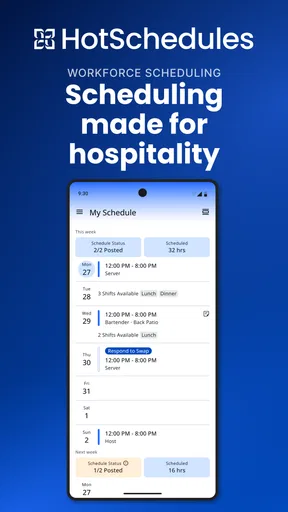
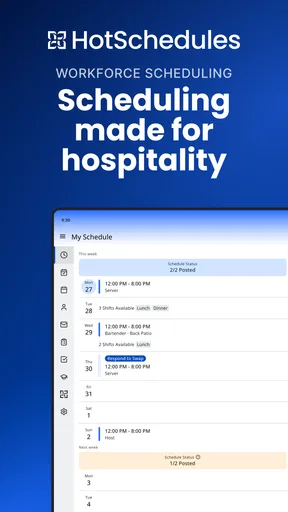
Once access is accepted, I would inspect the schedule carefully. Look at the day, start time, end time, and location or work area shown for the shift, if those details are part of the schedule presented to you. The point of this check is not just to see that the app opens. It is to verify that I am viewing the correct workplace and the correct employee account.
A useful habit is to compare the first displayed shift with a schedule notice or conversation you already trust. If the app shows something different, do not automatically assume that one side is wrong. Schedules can change, and the most sensible next step is to confirm the discrepancy with a manager or scheduling contact. The app can display the schedule it has received, but it cannot resolve a workplace decision by itself.
I would also spend a moment learning how the schedule is organized before relying on it during a rushed morning. Notice how you move between days or weeks, where the next shift appears, and how the app presents a shift that crosses a date boundary. That last case is easy to mishandle in any schedule tool: a late-night shift can feel like it belongs to one day while ending on the next. Checking the full entry is safer than relying on a quick glance.
Another practical tip is to make HotSchedules part of a routine rather than opening it only when you are already leaving home. I prefer checking the upcoming schedule at a calm moment, then checking again before a shift if my workplace frequently changes staffing. This reduces the chance that I will miss a revised time simply because I remembered an older version.
The first successful action: finding the next shift
The clearest first win is locating the next scheduled shift and understanding exactly what it requires from you. I would open the schedule, move to the relevant day, and read the complete entry instead of stopping at the first visible time. If the workplace includes role, department, or location information, those details can be just as important as the start time.
Imagine a realistic situation: I finish work on a busy evening and want to know whether I am opening the next morning or coming in later. Rather than searching through messages, I open HotSchedules and check the next entry. If the schedule is current, I can plan transportation, sleep, childcare, or another commitment around a specific shift. That is a modest action, but it is exactly where a work-scheduling app earns its place on my phone.
For someone new to the app, I suggest reading several upcoming entries in one sitting. This can reveal patterns that are easy to miss when checking only tomorrow: a split in working days, an unusually early start, or a change in location. It also gives me a chance to notice whether the schedule I see is complete and whether the account appears to belong to the right job.
One non-obvious advantage of this approach is that it separates memory from verification. I may remember being told that I work “this weekend,” but the app lets me check the actual day and time. That is especially helpful in workplaces where shifts vary and verbal announcements happen during noisy or rushed periods.
I would not use the app as my only backup for critical commitments. If a shift is especially important, I may write the time in my personal calendar after checking HotSchedules. The two tools serve different purposes: HotSchedules reflects the workplace schedule, while my personal calendar helps me understand how that shift fits with appointments and family plans. Copying the detail manually also forces me to notice conflicts early.
Where first-time users commonly get confused
The most important source of confusion is expecting HotSchedules to behave like Google Calendar, Apple Calendar, or a simple notes app. Those tools are designed around personal entries that I create and control. HotSchedules is centered on workplace scheduling, so the information I see depends on the account and schedule connected to my employer.
That difference explains why the app may feel limited if I install it without workplace instructions. A personal calendar is better for adding a dentist appointment, planning a holiday, or combining several parts of life in one view. HotSchedules is better for checking the schedule that my workplace maintains. I would not choose it as my only planning tool if my main need is organizing personal events.
Another common mistake is treating a displayed schedule as a permanent promise. In real workplaces, shifts can be adjusted. If I notice a change, I would check the entry again and confirm with the appropriate person when the change affects transportation, attendance, or another responsibility. The app is useful for visibility, but workplace communication still matters when something looks unclear.
Login trouble is another area where patience helps. If the account details do not work, repeatedly reinstalling the app is unlikely to solve a workplace account issue. I would first verify the exact credentials and whether my employer has finished setting up access. If the problem remains, I would contact the workplace scheduling administrator or the support route provided by the employer.
It is also worth distinguishing between not finding a particular item and the app failing entirely. A schedule entry may be located in a different day or view than expected, while a genuine access problem may prevent the account from showing the workplace information at all. I would first navigate through the schedule deliberately, then decide whether the issue is a display misunderstanding or an account problem.
The paid price can influence expectations too. At $2.99, I would want the app to save me enough time or uncertainty to justify installing it. For an employee whose workplace depends on HotSchedules, that can be reasonable because the app supports a specific daily need. For someone whose employer uses another scheduling system, paying for it would make little sense. The price is therefore less important than compatibility with the workplace.
Making the schedule useful in everyday life
After confirming that the basic schedule works, I would build a small personal workflow around it. First, I would check upcoming shifts at the start of the week. Second, I would review the next shift before ending the day. Third, I would compare unusual changes with my personal commitments. This is more reliable than opening the app randomly and hoping I remember what I saw.
A helpful trade-off is deciding how much information to transfer into a personal calendar. Copying every shift can create duplicate maintenance if the workplace changes the schedule. Copying only shifts that affect appointments or travel keeps my personal calendar useful without pretending it is the official source. I would keep HotSchedules as the place I verify the final schedule and use my personal calendar for broader planning.
For people with more than one job, the distinction becomes even more important. HotSchedules may be excellent for the workplace that uses it, but it may not combine cleanly with a second employer’s scheduling method. In that situation, a personal calendar or another planning system may be better as the overall view, with HotSchedules serving as the authoritative check for its own workplace.
For supervisors or employees who coordinate with a team, the value can also come from reducing repeated questions about ordinary schedule details. Instead of relying on a message thread that becomes difficult to search, staff can check the schedule in the app. That does not remove the need to communicate about exceptions, but it can make routine checking faster and less dependent on someone remembering an earlier conversation.
My strongest practical tip is to check the next shift from the full schedule view, not from memory or a partial notification. A notification can draw attention to an update, but the complete entry gives context. This matters when two shifts are close together, when a location differs, or when a change affects the following day.
Who will benefit most, and who should skip it
I think HotSchedules is a good fit for employees whose workplace actively uses it and who need a straightforward way to consult their assigned shifts. It is particularly useful for people with variable hours, rotating days, early openings, late closings, or schedules that are easy to misremember. The app can also help new employees establish a checking habit instead of depending entirely on verbal instructions.
It is less suitable for someone looking for a complete personal productivity suite. If I want task management, project planning, habit tracking, detailed calendar customization, or a unified view of several unrelated calendars, I would choose a broader productivity app. HotSchedules has a narrower purpose, and that focus is a strength only when the workplace connection exists.
I would also skip it if my employer does not use the service or has not provided a way to access it. Installing a scheduling app without an active workplace connection is unlikely to produce a useful personal planner. In that case, a normal calendar app would be the more sensible choice, especially if I am creating my own shifts or appointments manually.
People who dislike checking a separate work app may prefer a calendar workflow, but they should be careful about relying on copied entries alone. A personal calendar is convenient, yet it can become outdated when the official schedule changes. The best option for many users is not choosing one or the other: check HotSchedules for accuracy, then use a personal calendar for life planning.
How it compares with ordinary calendar alternatives
Compared with Apple Calendar or Google Calendar, HotSchedules feels more specialized. A general calendar gives me control over what I add and how I organize it. HotSchedules is valuable because it reflects a work schedule I may not want to recreate manually. That saves effort and reduces the chance of typing the wrong time into a personal event, provided the workplace information is current.
Compared with a paper schedule or a message from a manager, the app offers a more convenient place to check the schedule repeatedly. Paper can be easy to lose, and messages can be buried under unrelated conversations. Still, paper or direct communication may remain useful as a backup when access is unavailable or when an unusual change needs confirmation.
Compared with a broad employee-management platform, its usefulness depends on the exact tools and access enabled for the workplace. I would judge it primarily on whether I can reliably reach the schedule I need, not on whether it replaces every workplace conversation. A focused schedule tool can be better than an overloaded system when my daily question is simply, “When and where am I working next?”
The trade-off is flexibility. General calendars are better for combining work, family, appointments, and travel. HotSchedules is better at keeping work scheduling separate and tied to the employer’s system. I would not call one universally superior; they solve different problems.
My recommendation after using it as a daily check
HotSchedules makes the most sense when I use it for one clear job: verifying my workplace schedule and turning that information into a dependable routine. The path to success is uncomplicated. Get the correct workplace access, confirm the first displayed shift, inspect the surrounding schedule, and use a personal calendar only when broader planning requires it.
The app’s limitations are also clear. It is not the best choice as a general-purpose planner, and it cannot replace a manager when a schedule is disputed or unclear. The paid model means I would think twice before installing it without confirmation that my employer uses it. Those are meaningful considerations, but they do not undermine its usefulness for the right audience.
My final view is positive but specific: I would recommend it to a friend who has been told by work to use it, especially if changing shifts make ordinary reminders unreliable. I would advise that friend to focus on the first successful action—finding and checking the next shift—rather than trying to master every part of the app immediately. Once that habit is in place, HotSchedules becomes a practical checkpoint between the official workplace schedule and the rest of everyday life.
For a first-time user, the next step is simple: install the app, sign in with the workplace details you were given, and compare the next displayed shift with what you already expect. If those details line up, keep using it as the official schedule check and pair it with your preferred personal calendar when needed. If they do not, resolve the account or scheduling question before relying on the app for an important shift.
Best suited to employees whose workplace already uses HotSchedules. That single condition determines most of the experience, and it is the reason I would recommend it selectively rather than to every productivity-app user.
Pros
- Quickly view shifts
- schedules
- and workplace updates in one app.
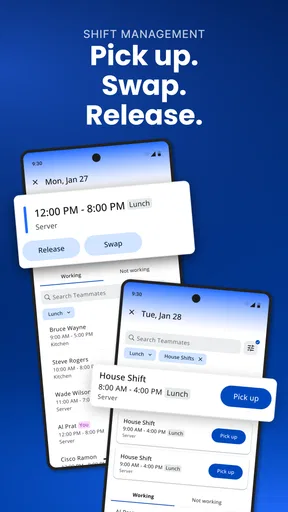
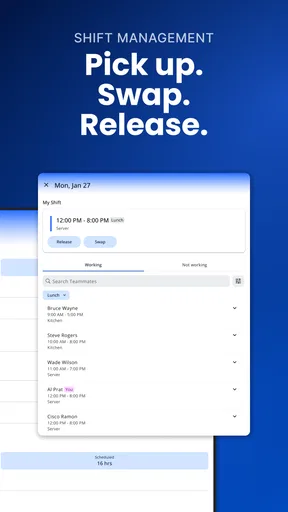
- Shift-swapping tools make requesting coverage more convenient.
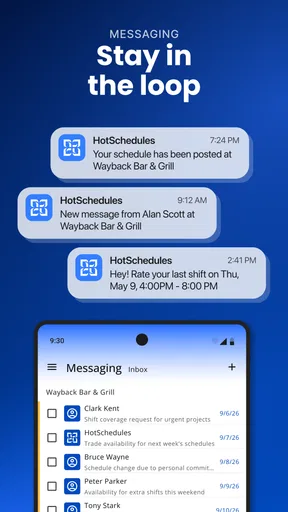
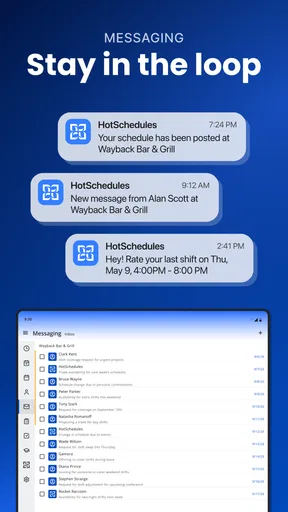
- Push notifications help you stay informed about schedule changes.
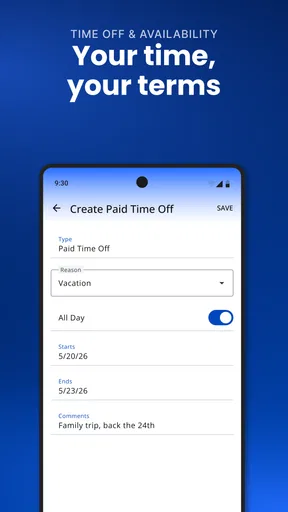
- Time-off requests can be submitted directly from your phone.
- Useful messaging features improve communication with coworkers and managers.
Cons
- Access usually requires an employer-provided account and login details.
- Some features may be unavailable if your workplace has limited the setup.
- Notifications can become excessive when schedules change frequently.
- The interface may feel confusing until you learn where each feature is.
- Performance and available tools can vary between employers and locations.
FAQs for HotSchedules
What is HotSchedules used for?
HotSchedules is a workforce-management app designed mainly for restaurants, hotels, and other hospitality businesses. After signing in through an employer account, employees can view published schedules, check shifts, request time off, swap or offer shifts, and communicate with coworkers or managers. The available tools depend on the company’s subscription and the permissions assigned to each user.
Can I use HotSchedules without an employer invitation?
Usually, no. HotSchedules is not a general-purpose scheduling app that anyone can freely set up for personal use. Your workplace must use the service, and a manager or administrator normally provides an account, invitation, or access instructions. If you download the app but do not have valid workplace credentials, you may be unable to view schedules or use its employee features.
How do I log in if I forget my HotSchedules username or password?
HotSchedules generally provides account-recovery options from the sign-in screen, such as username reminders or password-reset instructions. You may need access to the email address associated with your account and may be asked to confirm identifying information. If recovery does not work, contact your manager or workplace administrator, since they may need to verify your account or reset access.
Can HotSchedules automatically approve shift swaps and time-off requests?
Not necessarily. HotSchedules can let employees submit availability changes, time-off requests, and shift swaps, but approval rules are controlled by the employer. Some requests may require manager approval, while certain shift trades may be accepted only when staffing requirements and workplace policies are met. Always check the request status in the app rather than assuming it has been approved.
Does HotSchedules send notifications about schedule changes?
HotSchedules can send alerts about newly published schedules, shift changes, messages, and other workplace updates, depending on the settings configured by your employer and on your device. Notifications may also depend on Android or iOS permissions, internet access, and the app version. It is still wise to check the schedule regularly, especially before an important shift, because notifications can be delayed or disabled.


